The EPG (electronic programme guide) is the TV guide inside your IPTV player: what's on now, what's on next and – on channels with catch-up – what you missed. On Freeview the guide arrives with the broadcast signal. With IPTV it comes from a separate source and has to be matched to each channel, which is why a channel can play perfectly while its row in the guide stays empty.
Where the guide data comes from
Two things have to meet inside your player:
- The channel list – from your Xtream Codes login or your M3U link. Each channel carries an identifier called
tvg-id. - The programme data – an XMLTV file that lists every programme with its start time, end time and the ID of the channel it belongs to.
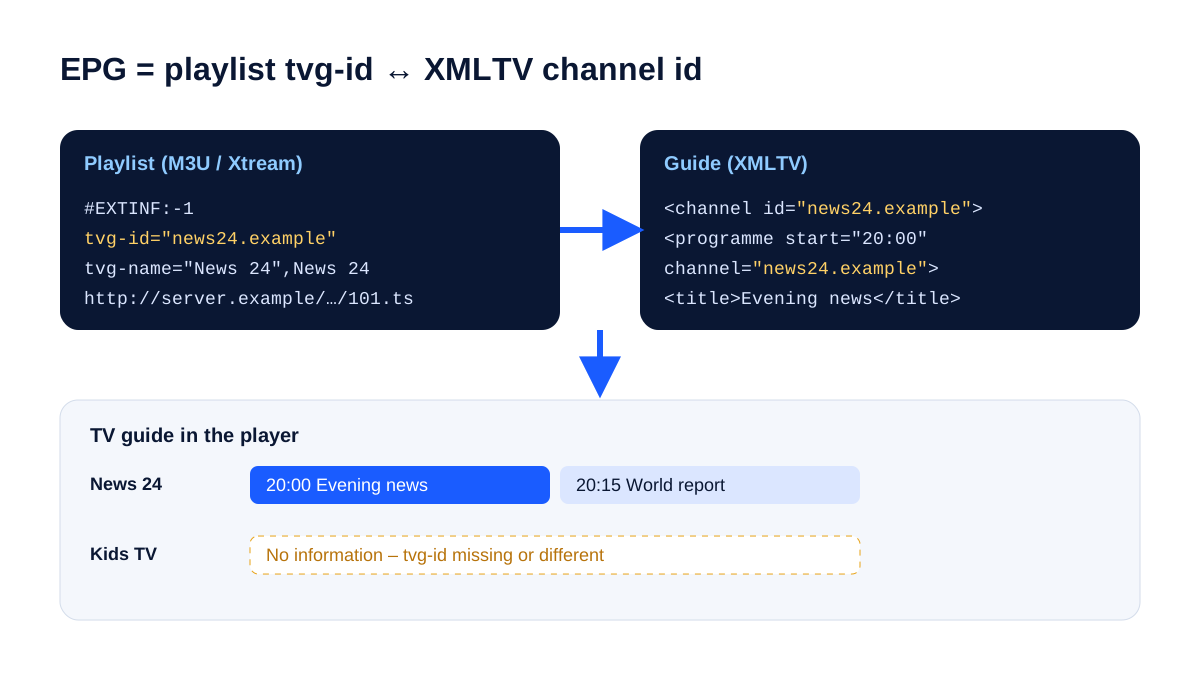
When the two IDs match, the guide fills in. When a channel has no ID, or a different one, that row stays blank.
Who loads the guide: Xtream Codes or M3U?
| Login type | Where the guide comes from | What you need to do |
|---|---|---|
| Xtream Codes | loaded automatically from the server | usually nothing – refresh it if it's empty |
| M3U link | often a separate XMLTV ("EPG") URL | paste the EPG link into the player's guide settings |
The two login types are compared in Xtream Codes vs M3U; what's inside an M3U playlist is covered in M3U playlists explained.
Setting up the guide in popular players
Menus change between app versions, so the names below may differ slightly.
TiviMate (Android TV, Google TV, Firestick)
- Open Settings → EPG and check that a source is listed.
- For an M3U playlist, add the XMLTV link as an extra EPG source.
- Choose Update EPG and give it a few minutes on the first load.
Kodi with PVR IPTV Simple Client
- Open the add-on's settings, go to EPG, choose a remote path and paste the XMLTV URL.
- Restart Kodi – the guide appears under TV → Guide.
Samsung and LG TV apps
- Most load the guide from the Xtream Codes login. Look for Refresh EPG or Reload playlist in the app's settings.
Which player suits which device is covered in IPTV player apps.
Problem: the whole guide is empty
- Refresh or update the EPG in the player and wait – a guide covering thousands of channels takes a while to download.
- With an M3U playlist, check that an EPG link has actually been entered.
- Restart the app. On a Firestick or Android TV box, clearing the app's cache helps if it stays empty.
- Check the date and time on the device. A wrong system date makes the player look for programmes in the wrong window.
Problem: everything is exactly one hour out
This is the classic UK issue, and it often appears around the clock change in March and October. Guide times are stored with a time-zone offset, and the player converts them using the device's own clock.
- Set the device to automatic date and time and the time zone to London (GMT/BST).
- If the guide is still out, use the player's EPG time shift or offset setting to correct it by one hour.
- After the clocks change, refresh the guide so the new offset is applied.
Problem: some channels have no guide
Not every channel has programme data. Small international channels, event channels and pop-up channels often run without a guide. If a well-known channel is blank, send support the channel name – it's usually an ID mismatch that can be corrected on the server.
Problem: a channel shows another channel's programmes
The channel has been matched to the wrong ID – for example, a regional or HD variant of the same channel. Some players let you assign the guide manually: long-press the channel and look for an option such as EPG source or Change EPG.
Catch-up lives in the guide
Catch-up (replay) works through the EPG: you scroll back in the guide and pick a programme that has already aired. It only works on channels that support it – usually marked with a clock or rewind icon – and only where guide data exists. No guide for a channel means no practical way to choose a past programme on it.
Frequently asked questions
What does EPG stand for?
Electronic programme guide – the on-screen TV listings in your player.
Does KIVARO include a TV guide?
Yes. With Xtream Codes the guide loads automatically in supported players; with an M3U playlist you can add the EPG link from your customer area. You can check it on your own device in the free 24-hour trial.
Why does the guide take so long to load?
It's a large file covering many channels and several days. The first load is the slowest; after that most players update it in the background. If even channel lists load slowly, check your internet speed.