Short answer: if your player supports Xtream Codes, use it. You get live TV, films and series in separate sections with artwork, the TV guide usually loads by itself, and the player can show when your subscription ends. Use the M3U link when an app doesn't offer Xtream Codes, or when you just want a quick test in VLC.
Two ways to say the same thing
Both formats give your player access to the same subscription. The difference is how the information is delivered:
- Xtream Codes is a login. The player signs in with a server URL, username and password and asks the server for each part separately – live channels, films, series, guide, account status.
- M3U is a list. The player downloads one text file with every channel and its stream address, and works from that.
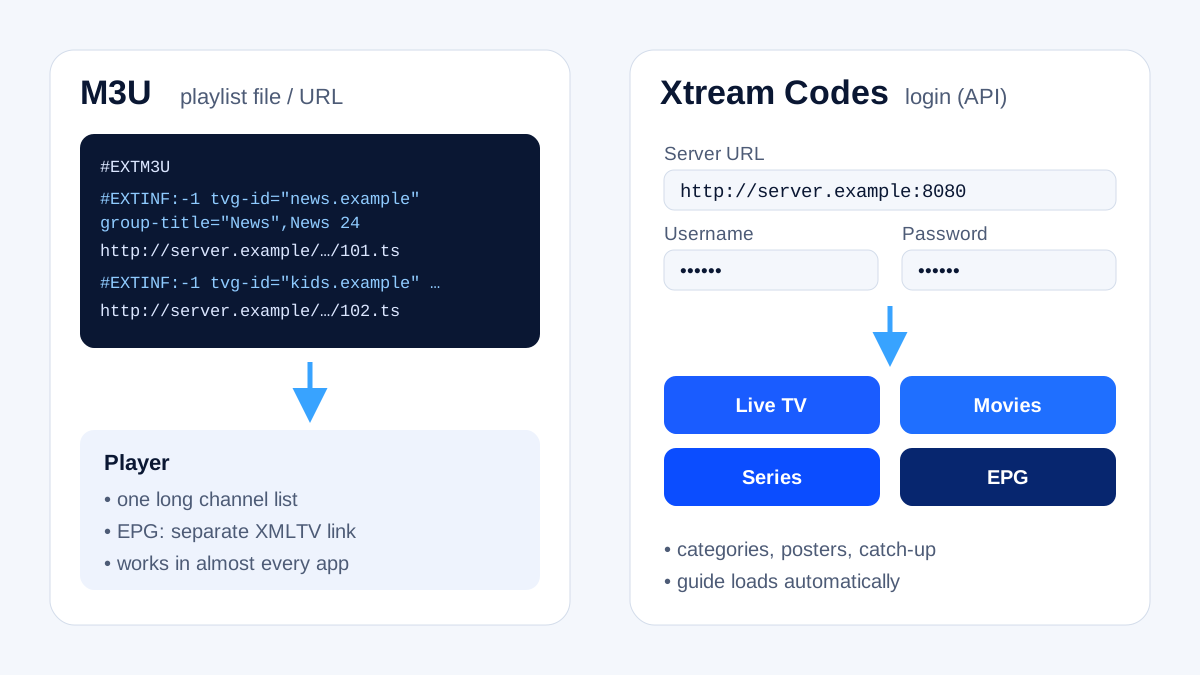
The name comes from a server panel that was popular years ago. The original software is no longer developed, but its login format lives on as a de-facto standard supported by most IPTV players.
Side by side
| Xtream Codes | M3U link | |
|---|---|---|
| What you enter | server URL, username, password | one long link |
| Films and series | separate sections with posters and descriptions | often mixed into one long list |
| TV guide | usually automatic | often needs a separate EPG link |
| Subscription end date | shown in many players | not shown |
| Loading large catalogues | faster – sections load on demand | slower – everything at once |
| Works in | most dedicated IPTV players | almost every player, including VLC and Kodi |
What you type with Xtream Codes
You'll have three details from your customer area or welcome message:
- Server URL – for example
http://line.example.com:8080 - Username
- Password
Some players also ask for a playlist name – that's just a label you choose, such as "Living room".
The login errors we see most
- Missing
http://– many players need the full address, including the scheme. - Missing port – if your URL includes
:8080or another number, it must be entered too. - Extra characters – a trailing slash, a space or a full stop copied from a message can break the login.
- Capital letters – usernames and passwords are case-sensitive.
- Autocorrect – phone keyboards love to "fix" usernames. Paste instead of typing, or switch autocorrect off.
If the player still says "invalid login", test the same details in another app. If they fail everywhere, contact support; if they work elsewhere, the first app is the problem.
When M3U is the better choice
- Your player or TV app doesn't support Xtream Codes.
- You want to check a stream quickly in VLC on a computer – see IPTV on Windows and Mac.
- You use Kodi with the official PVR IPTV Simple Client, which works with M3U plus an EPG link.
How an M3U is put together, and how to keep a long list manageable, is explained in M3U playlists explained. If the guide stays empty with M3U, see IPTV EPG explained.
Can I use both at the same time?
You can add both to different apps – for example Xtream Codes in TiviMate on the TV and M3U in VLC on a laptop. They count against the same subscription, so the number of devices you can watch on at the same time depends on your plan.
Frequently asked questions
Is Xtream Codes an app?
No. It's a login format that many player apps support. You still need a player – see IPTV player apps, or the Firestick setup guide for a step-by-step example.
Is Xtream Codes safer than M3U?
Both carry your login details, so treat them the same way: don't share them, and only enter them in apps from official app stores or the developer's own website.
Which one does KIVARO provide?
Both. Your customer area shows the Xtream Codes details and an M3U link, and you can try them in the free 24-hour trial.