IPTV stands for Internet Protocol Television: TV that reaches you over your broadband connection instead of a rooftop aerial, satellite dish or cable line. Channels, films and series are sent as data streams and played by an app on your smart TV, Firestick, phone, tablet or computer.
You probably use IPTV already without calling it that. BT TV, EE TV and the live channels inside BBC iPlayer or ITVX all travel over the internet. The difference with an IPTV subscription service is that one app brings live channels, an on-demand library and a TV guide together on almost any device.
In short: for IPTV you need a stable broadband connection (around 16 Mbps for Full HD), a compatible device and a player app. Your login details – Xtream Codes or an M3U link – let the app load the channels, the library and the guide.
How IPTV works
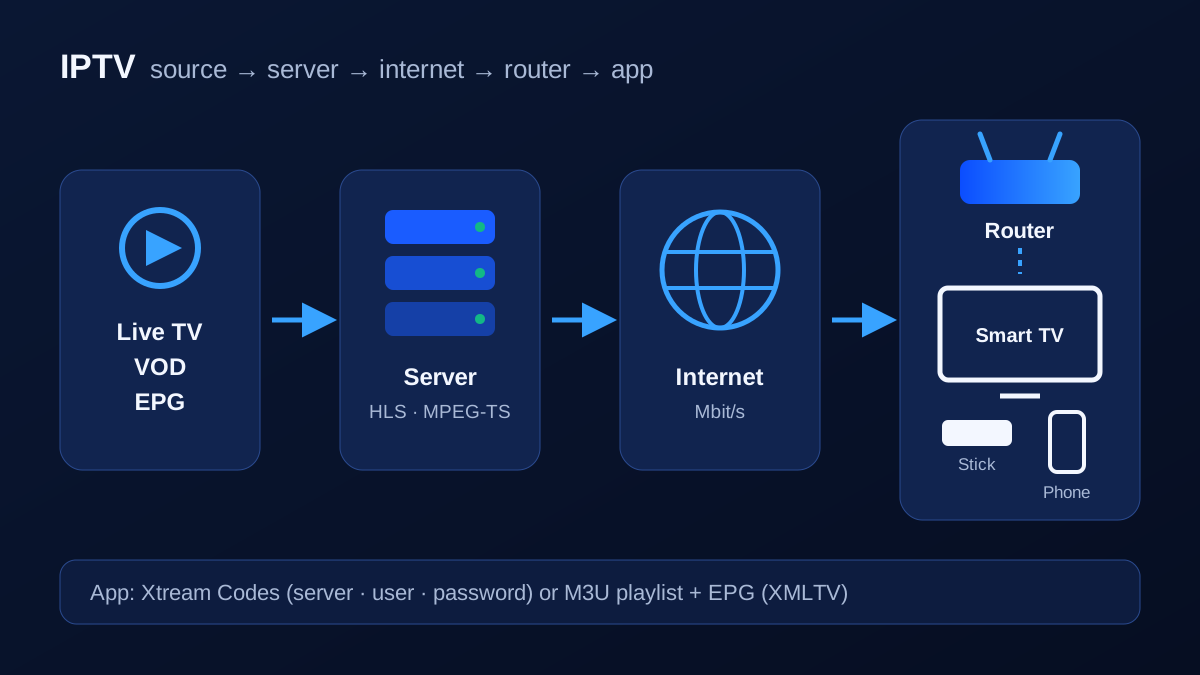
Traditional broadcast TV sends every channel to every home at the same time. With IPTV, your device requests only the channel you are watching. The stream takes four steps:
- Source – a channel or library provides the video.
- Server – the video is compressed (usually H.264 or H.265/HEVC) and cut into small chunks, typically as an HLS or MPEG-TS stream.
- Internet – the chunks travel across the internet to your router.
- App – the player on your device reassembles them, keeps a few seconds in a buffer and shows the picture.
Live TV, video on demand and catch-up
Most IPTV subscriptions combine three things:
- Live TV – channels in real time, grouped by category or country.
- Video on demand (VOD) – films and series you start whenever you like.
- Catch-up – on selected channels you can go back and watch programmes from the past few days.
The electronic programme guide (EPG) ties it together by showing what is on now and next. How the guide is matched to each channel is explained in our EPG guide.
Managed IPTV versus IPTV over the open internet
Broadband providers that sell their own TV often deliver it inside their managed network, sometimes using multicast, where one stream feeds many homes at once. Independent services such as KIVARO reach you over the public internet, so every viewer gets their own stream (unicast). That makes the service independent of your broadband provider – but it also means your connection and home Wi-Fi directly affect picture quality.
What you need for IPTV
| What | Why | Tip |
|---|---|---|
| Broadband | carries the stream | Plan for about 10 Mbps for HD, 16 Mbps for Full HD and 25 Mbps for 4K |
| Device | shows the picture | Smart TV, Firestick, Android TV box, Apple TV, phone or computer |
| Player app | plays channels and the library | Must support Xtream Codes or M3U |
| Login details | connect the app to the service | Server URL, username and password, or an M3U link |
The headline speed on your broadband contract is only the ceiling. What matters is what actually reaches the TV in the evening, especially over Wi-Fi. Our guide What internet speed do you need for IPTV? shows how to measure it properly.
Login details: Xtream Codes, M3U and EPG
When you order or request a trial, you receive your access in one of two forms:
- Xtream Codes – a server URL, username and password. The app loads live TV, films, series and the guide separately, with artwork. This is the recommended option.
- M3U link – a playlist file or URL. It works in almost every player but often shows one long channel list, and the guide needs its own link.
Xtream Codes vs M3U compares the two in detail, and M3U playlists explained shows what a playlist looks like inside.
Which devices work?
| Device | How | Guide |
|---|---|---|
| Amazon Fire TV Stick | install a player app, sign in | Firestick setup |
| Samsung smart TV | app from the Samsung store, often with activation | Samsung |
| LG smart TV (webOS) | app from the LG store | LG |
| Android TV, Google TV, Android boxes | app from Google Play | Android TV |
| iPhone, iPad, Apple TV | app from the App Store | Apple devices |
| Windows and Mac | desktop player or VLC | IPTV on a computer |
See all supported devices, and use our IPTV player guide to pick an app.
IPTV, Freeview, satellite or streaming apps?
Freeview and Freesat are free and very stable but limited to broadcast channels. Cable and satellite packages are reliable but tie you to a box and a contract. Streaming apps such as iPlayer or ITVX are legal and simple but each covers only its own content. IPTV is flexible and runs on many devices, as long as your broadband is up to it. The full comparison is in IPTV vs cable vs satellite.
Is IPTV legal?
The technology is completely legal – broadcasters and broadband providers use it every day. What matters is whether a service has the rights to the content it distributes. In the UK, users of illegal services have received official warnings and can be prosecuted. Read Is IPTV legal in the UK? before you buy anything.
Common problems and quick fixes
- Picture freezing or loading all the time: IPTV buffering fixes
- Router and Wi-Fi settings: best Wi-Fi setup for IPTV
- Errors on a Firestick: IPTV not working on Firestick
- Empty TV guide: EPG explained
Getting started with KIVARO
- Test for free – request the 24-hour trial; no payment details needed. Our team sends your login and a suitable app for your device.
- Set up – follow the step-by-step setup guide.
- Check – watch at your usual viewing times and note how quickly channels switch. How to test IPTV properly has a checklist.
- Choose a plan – if everything works, pick a length on the pricing page. Plans don't renew automatically.
Frequently asked questions
Do I need a special box for IPTV?
No. A smart TV with a suitable app, a Firestick or an Android TV box is enough. Dedicated boxes such as MAG devices are optional.
Does IPTV work without a TV licence?
In the UK you need a TV licence to watch or record live TV on any channel, on any device – including via IPTV – and to use BBC iPlayer. That rule depends on what you watch, not on the technology.
How much data does IPTV use?
It depends on the quality. One hour of Full HD can use several gigabytes and 4K considerably more. On unlimited home broadband that rarely matters; on mobile data, lower the quality.
Can I use IPTV on more than one device?
You can set up your login on several devices. How many can stream at the same time depends on your plan – see pricing.